Your health records,
powered by AI
Connect Claude to your Alberta health data. Ask about lab results, vaccines, medicines, appointments, and more — just by asking.

Family & Caregiver Access
Now you can view health records for family members who have shared access with you through AHS MyChart. Help elderly parents track their medications, check your child's immunizations, or review test results for anyone who has granted you access.
Just ask Claude: "Do I have access to any shared health records?" — then switch to viewing their data with a simple request.
What it does
A Claude Desktop extension that connects to Alberta's official health portals.
Ask in Plain Language
No medical jargon required. Ask Claude anything about your health records the way you'd ask a friend.
44 Health Tools
Lab results, vaccines, medicines, vitals, imaging, procedures, appointments, doctor's notes, and more.
One-Click Install
Download, double-click, done. No Node.js, no terminal, no setup files, no special codes.
How it works
Three steps. No technical knowledge required.
Install
Download the extension file and double-click it. Claude Desktop installs it automatically. You'll see a security warning — that's normal and means your data stays on your computer.
Sign In
Tell Claude to connect your account. Chrome opens Alberta's real sign-in page — you log in with your MyAlberta Digital ID.
Ask Claude
"Show me my recent labs." "Am I up to date on my vaccines?" "Explain my blood work." Claude does the rest.
Why does it run on your computer?
With the Claude Desktop extension, your health data goes directly between your computer and Alberta's health portals — it never passes through our servers. Claude Desktop shows a security warning during install because the extension runs locally. That's the point — it's how we keep your data private. We chose this approach specifically to protect your health information. (The web portal beta works differently — see the privacy section below.)
See what AI finds in your health data
Real screenshots of Claude analyzing sample Alberta health records — lab trends, medication reviews, blood pressure monitoring, and doctor appointment prep.
View Demo Gallery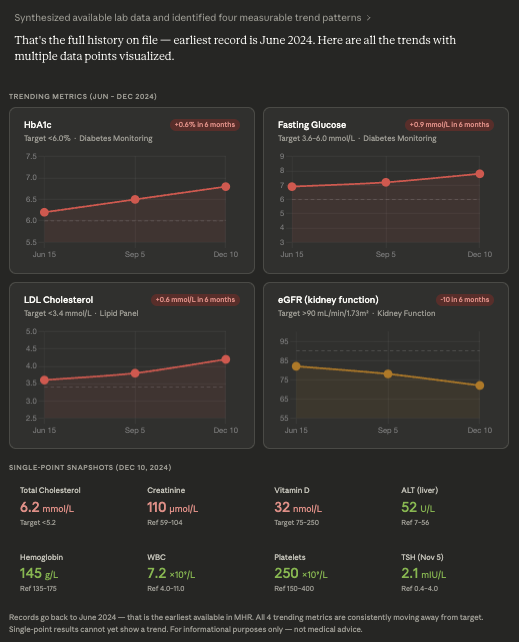
Try it right now — Demo Mode
See what it looks like when AI reads your health data. Demo mode uses realistic sample data so you can explore all 44 tools — no Alberta account required.
"Connect to health data in demo mode"
Connects instantly — no browser, no login
"Get a full health report"
Claude gathers labs, medicines, vitals, vaccines, and more across both portals
"What health concerns can you identify? What patterns do you see?"
AI connects the dots — It spots unusual trends and drug interactions you might miss when looking at each page on its own
"Put this in a PDF I can take to my doctor"
Get a doctor-ready summary of findings and questions to discuss
What AI finds in the sample data
Worsening diabetes control
HbA1c trending up: 6.2% → 6.5% → 6.8%
High heart disease risk
High LDL + diabetes + high blood pressure combined
Severe Vitamin D deficiency
32 nmol/L (normal: 75–250) — common in Alberta
Kidney function declining
eGFR 72 — worth monitoring on Metformin
Drug and lab result concerns
Statin + borderline liver enzymes need watching
Uneven blood pressure
Mostly controlled but spikes to 145/92
These are the kinds of patterns that are easy to miss when browsing individual portal pages — but AI sees the full picture.
See it in action
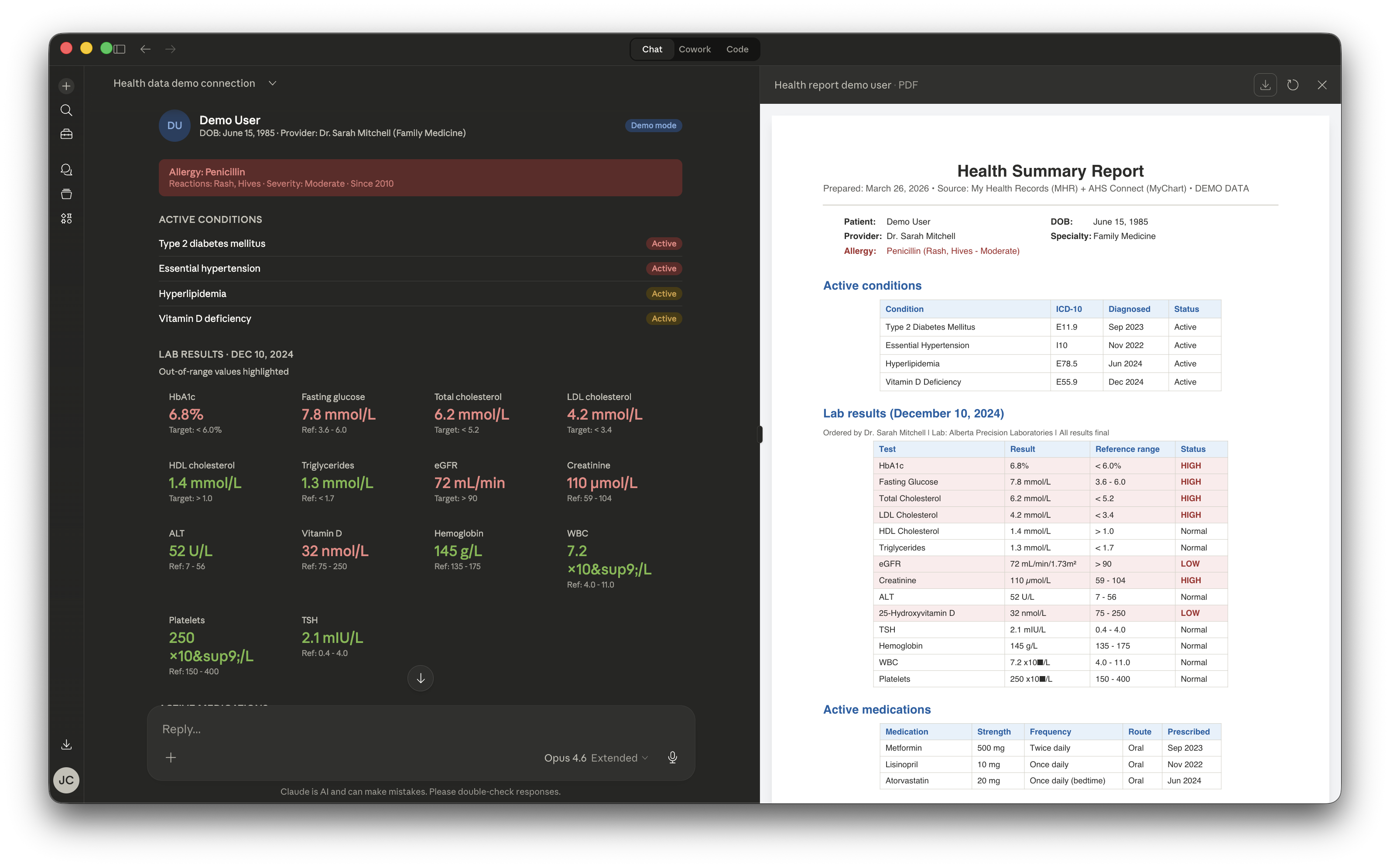
Claude analyzes demo health data and generates a PDF report — click to enlarge
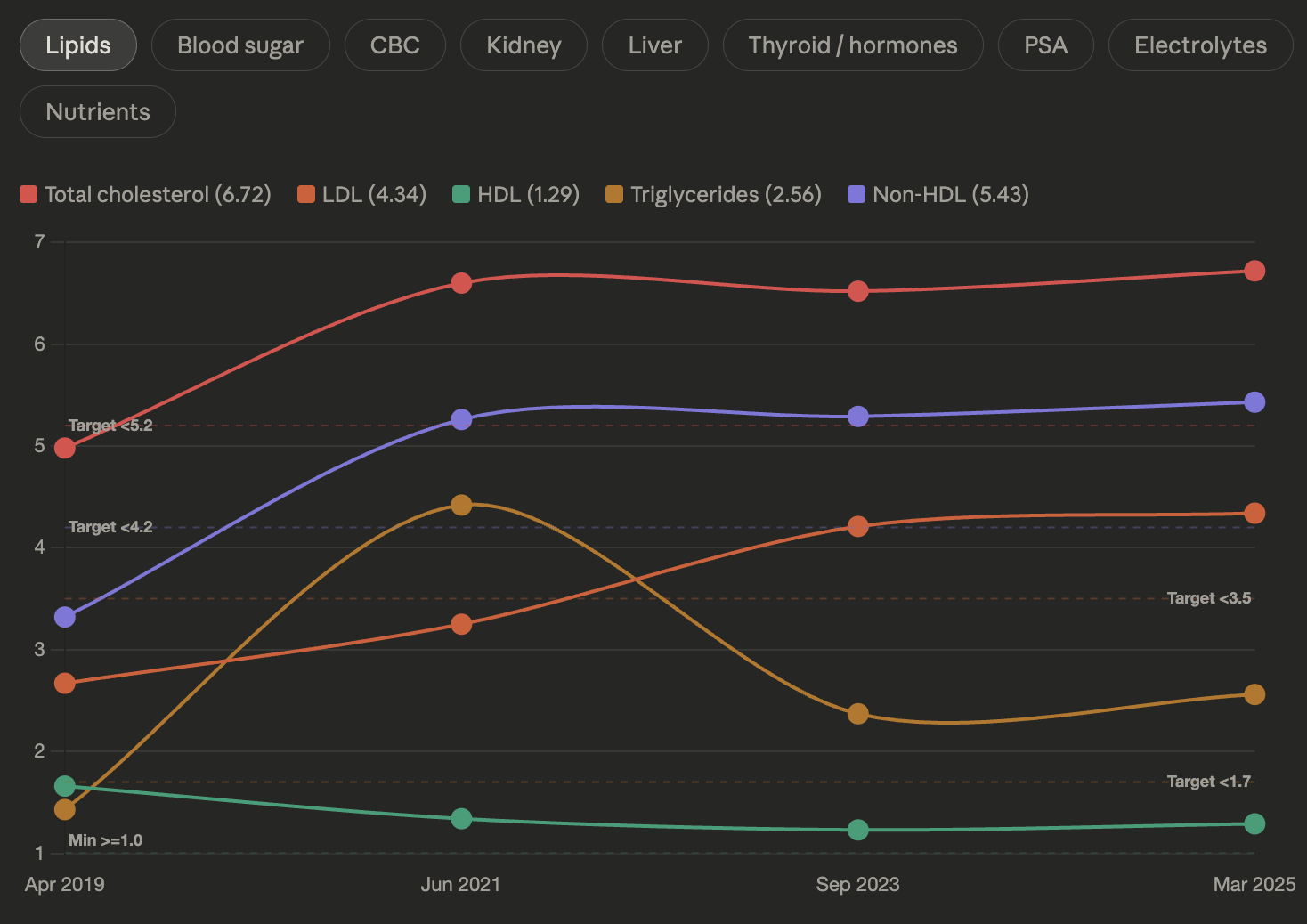
Claude charts lab trends over time — spotting patterns like rising LDL and cholesterol — click to enlarge
Download Sample Health Report (PDF)Demo mode is built-in — try it immediately after installing
Accessibility benefits
Health portals are complex — multiple logins, dense tables, medical jargon. Talking to AI takes away those problems and makes your health data easy to get to.
Voice interaction
Speak naturally to access your health data — no typing required. Claude Desktop supports voice input, helping people who have trouble moving, typing, or seeing.
Plain language explanations
AI translates medical jargon into language you understand. Ask follow-up questions, learn about health problems, and go to your next visit ready with questions.
No complex navigation
One conversation replaces dozens of clicks across two separate portals. No menus, tabs, or page loads — just ask and get answers. Especially helpful for elderly users or anyone overwhelmed by complex interfaces.
Screen reader friendly
Claude's text-based responses work naturally with screen readers — unlike the busy portal pages full of charts and tables that screen readers have trouble with.
Doctor visit preparation
Generate PDF summaries, organize health concerns, and prepare questions before appointments. Helpful for anyone who finds it hard to explain problems when rushed, feels nervous about health, or is dealing with a tricky health problem.
Multilingual support
Claude can explain your health data in languages other than English — important for Alberta's diverse communities where English may not be a first language.
Help for caregivers
Family members managing health for elderly parents or dependents can quickly pull a full picture across all their records — labs, medicines, appointments, referrals — without having to learn two different websites.
This tool is not a doctor. Always talk to your doctor about your health.
Important: Not medical advice
• This tool helps you find your health info. It does not give medical advice. It is not a medical device or health service.
• Always talk to your doctor about what you find and any health choices. AI can spot patterns but cannot tell you what is wrong or how to treat it.
• If you need medical help, do not wait because of what this tool says. If you have a medical emergency, call 911 right away.
Where your data goes
Here's exactly what happens when you use MyAI Health. We offer two paths — they work differently.
📦 Claude Desktop extension
Data goes direct — our servers never see your health records.
🌐 Web portal (beta)
Data passes through our Canadian server. Everything stays in Canada.
Claude Desktop extension path
Your computer talks directly to Alberta Health
The extension runs on your computer and fetches your health data straight from Alberta's official portals. With the Claude Desktop extension, your data does not pass through our servers — there's no middleman. (The web portal beta routes data through our Canadian server — see the portal path section above.)
Your health data is sent to Claude for your conversation
Claude is an AI made by Anthropic. Their servers are in the United States. When Claude reads your health data to answer your questions, that data is sent to Anthropic's servers. Anthropic may keep your conversations for up to 30 days. See Anthropic's privacy policy for details.
Nothing stored by us
The extension throws away your health data after each conversation. The only thing saved on your computer is an encrypted login session — no health records, no personal information. Your password is entered directly on Alberta's website and never touches the extension.
Protect yourself: turn off AI training
By default, Anthropic may use your conversations to improve Claude. To prevent this, open Claude Desktop and go to Settings → Privacy → turn off "Improve Claude". This tells Anthropic not to use your health conversations for AI training.
Read-Only
Cannot change or delete anything in your health portals
Things you can ask
44 tools across My Health Records and AHS MyChart (Connect Care).
"Show me my lab results from the last year and flag anything unusual"
"Am I up to date on all my vaccinations?"
"What medicines am I currently on according to AHS Connect Care?"
"Explain my most recent blood work in plain language"
"Download my latest scans and X-rays report"
"Show me my upcoming appointments and any messages from my doctors"
"Give me a complete health summary — profile, vaccines, medicines, and recent labs"
"Do I have any active referrals or pending orders?"
Covers lab results · vaccines · medicines · vitals · blood pressure · blood glucose · imaging · procedures · referrals · appointments · allergies · care team · messages · documents · and more
My Health Records
myhealthrecords.alberta.ca
- ✓ Lab results, scans, and X-rays
- ✓ Vaccine records
- ✓ Medicines and prescriptions
- ✓ Vitals, blood pressure, blood glucose
- ✓ Treatments and referrals
- ✓ Download files (PDFs and images)
AHS MyChart (Connect Care)
myahsconnect.albertahealthservices.ca
- ✓ Appointments & visit history
- ✓ Test results & doctor's notes and reports
- ✓ Allergies & health issues
- ✓ Care team & messages
- ✓ Medicines & vaccines
- ✓ Family medical history & goals
Research what your results mean
Add the free PubMed connector to Claude and search millions of medical research articles — guided by your own health records.
What is PubMed?
PubMed is a free database of over 36 million medical research articles. It's run by the U.S. National Library of Medicine. Doctors and researchers use it every day to find the latest studies and evidence. When you add it to Claude, you can search it too — just by asking.
Visit PubMedYour health information stays private
When Claude searches PubMed, it only sends search words — like "high cholesterol treatment studies." Your name, health data, and personal details are never shared with PubMed. Claude uses your records to pick the right search words, but your private information never leaves your conversation.
How to set it up
Open Claude Desktop and click Settings
Click Connectors, then find PubMed
Click Connect — that's it!
PubMed is free. No account or API key needed.
Try asking Claude
"My last blood work showed high LDL cholesterol — find me recent research on how to lower it naturally"
"I'm on metformin — what does the latest research say about side effects?"
"My ferritin levels are low — what do studies say about iron supplements?"
"Find research about the vaccine I just got and how long immunity lasts"
Request early access
We're rolling this out carefully. Submit your info and we'll send you a download link.
Request received!
We'll review your request and send you a download link by email. This usually takes less than 24 hours.
Requirements
This extension currently only works with the Claude Desktop app — not the web version at claude.ai.
Frequently asked questions
What is MyAI Health?
MyAI Health is a Claude Desktop extension that connects to Alberta's My Health Records portal and AHS MyChart (Connect Care). It lets you ask about your lab results, vaccines, medicines, vitals, and appointments in plain language — no medical jargon required.
Is my health data stored or shared?
No health data is stored by us — but the details depend on which path you use. Claude Desktop extension: your health data goes directly between your computer and Alberta Health; it never hits our servers. It's then sent to Claude (Anthropic) on US-based servers for your AI conversation. Web portal beta: your data passes through our Canadian server (Azure Canada Central) and the AI (Azure OpenAI Canada East) — everything stays in Canada. In both cases, no health data is saved to any database. Only an encrypted sign-in session is stored, and only for about 10 minutes. Your username and password are entered directly on Alberta's sign-in page and never touch our servers.
What do I need to use it?
You need the Claude Desktop app (macOS or Windows), a MyAlberta Digital ID with My Health Records access, and Google Chrome installed on your computer. No special codes, no command line, no setup files.
Does this provide medical advice?
No. MyAI Health is a tool that finds your health info. It is not a medical device. It helps you access and understand your health records, but it does not provide medical advice, diagnose conditions, or recommend treatments. Always consult your doctor or healthcare provider for medical decisions.
Which health portals are supported?
MyAI Health connects to two Alberta health portals: My Health Records (myhealthrecords.alberta.ca) for lab results, vaccines, medicines, vitals, imaging, and procedures; and AHS MyChart / Connect Care (myahsconnect.albertahealthservices.ca) for appointments, messages, care team, allergies, doctor's notes, and test results.
Is it free?
The MyAI Health extension is free. You do need a Claude Desktop subscription (from Anthropic) to use it. The extension itself is open source.
Why does Claude Desktop say "Installing will grant access to everything on your computer"?
Claude Desktop shows this warning for all extensions that run on your computer — it's not specific to MyAI Health. The extension only connects to Alberta's health portals over the internet. It does not read your files, browse your folders, or access anything else on your computer. The source code is open source on GitHub so you can verify this yourself.
Can I view health records for family members?
Yes — if a family member has granted you proxy access through AHS MyChart (Connect Care), you can view their health records too. Just ask Claude to list your shared records, then switch to viewing their data. This works for parents checking their children's records, adult children helping elderly parents, or anyone who has been granted shared access.
Built with
